
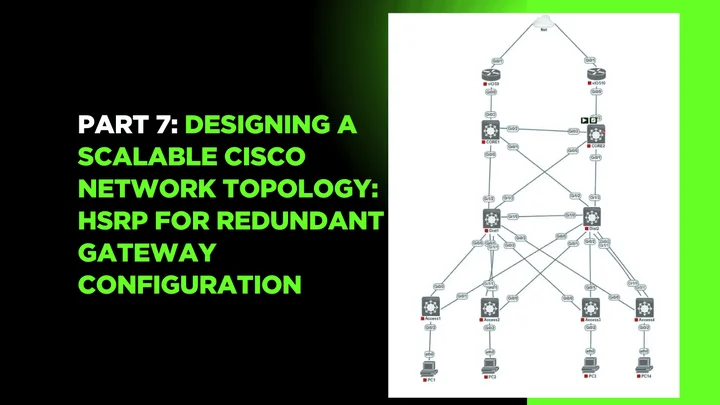
Part 7: Designing a Scalable Cisco Network Topology: HSRP for Redundant Gateway Configuration
 Suresh Thapa
High Availability is crucial in enterprise networks — especially at the default gateway level. If the gateway fails, devices in that VLAN lose access to the rest of the network and the Internet. To solve this, Cisco provides the Hot Standby Router Protocol (HSRP).
In this part, you'll configure HSRP between your two Layer 3 switches (Dist1 and Dist2) to create redundant virtual gateways for each VLAN. This ensures that if the active switch fails, the standby switch takes over seamlessly, and end devices keep communicating without interruption.
Objectives
- Understand HSRP and why it’s used for gateway redundancy.
- Configure HSRP for each VLAN on both L3 switches.
- Set Dist1 as the primary (Active) for VLANs 60 and 62 and Dist2 as the primary (Active) for VLANs 61 and 63.
- Test failover by shutting down an active interface.
What is HSRP?
- HSRP creates a virtual IP address and MAC address shared between two routers or L3 switches.
- One switch is Active, the other is Standby.
- End devices use the virtual IP as their gateway.
- If the active switch fails, the standby takes over instantly.
Example Setup for VLAN 10 (Admin VLAN)
| Role | Dist1 (Active) | Dist2 (Standby) |
|---|---|---|
| Real IP | 10.1.60.2 | 10.1.60.3 |
| Virtual IP (HSRP) | 10.1.60.1 | Same |
Plan for the HSRP Active and Backup
| Switches | VLANs | Role |
|---|---|---|
| Dist1 | 60 | Active |
| Dist1 | 61 | Backup |
| Dist1 | 62 | Active |
| Dist1 | 63 | Backup |
| Dist2 | 60 | Backup |
| Dist2 | 61 | Active |
| Dist2 | 62 | Backup |
| Dist2 | 63 | Active |
Clients in VLAN 10 use 10.1.60.1 as their default gateway.
Network Topology
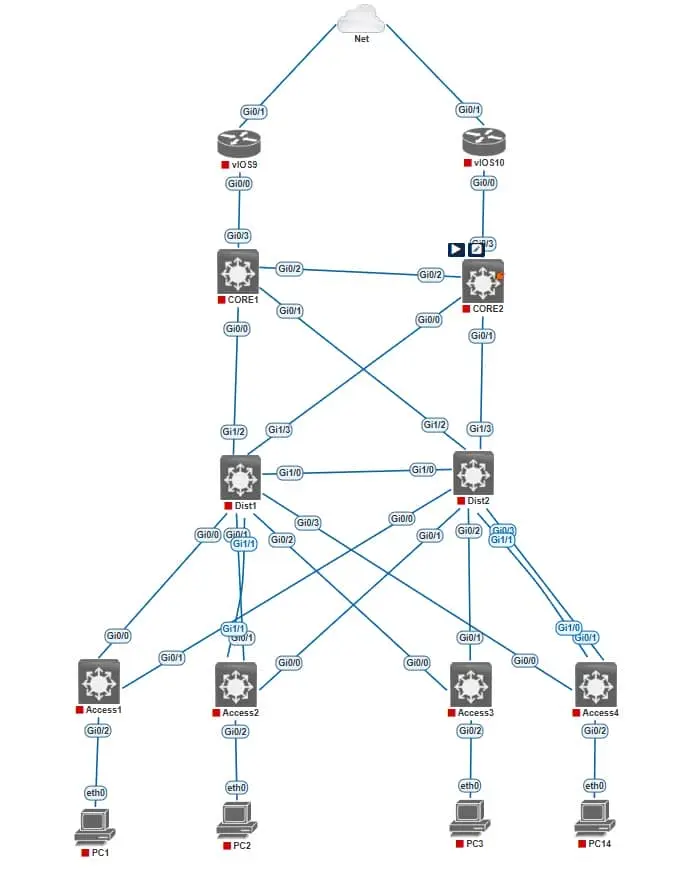
HSRP Configuration on Dist1 Switch
Dist1(config)#interface Vlan60
Dist1(config-if)#ip address 10.1.60.2 255.255.255.0
Dist1(config-if)#standby 60 ip 10.1.60.1
Dist1(config-if)#standby 60 priority 200
Dist1(config-if)#standby 60 preempt

Dist1(config)#interface Vlan61
Dist1(config-if)#ip address 10.1.61.2 255.255.255.0
Dist1(config-if)#standby 61 ip 10.1.61.1
Dist1(config-if)#standby 61 priority 100
Dist1(config-if)#standby 61 preempt

Dist1(config)#interface Vlan62
Dist1(config-if)#ip address 10.1.62.2 255.255.255.0
Dist1(config-if)#standby 62 ip 10.1.62.1
Dist1(config-if)#standby 62 priority 200
Dist1(config-if)#standby 62 preempt

Dist1(config)#interface Vlan63
Dist1(config-if)#ip address 10.1.63.2 255.255.255.0
Dist1(config-if)#standby 63 ip 10.1.63.1
Dist1(config-if)#standby 63 priority 100
Dist1(config-if)#standby 63 preempt
HSRP Configuration on Dist2 Switch
Dist1(config)#interface Vlan60
Dist1(config-if)#ip address 10.1.60.3 255.255.255.0
Dist1(config-if)#standby 60 ip 10.1.60.1
Dist1(config-if)#standby 60 show standby brief
show standby vlan 10
show standby | include Active
ping 192.168.10.1100
Dist1(config-if)#standby 60 preempt

Dist1(config)#interface Vlan61
Dist1(config-if)#ip address 10.1.61.3 255.255.255.0
Dist1(config-if)#standby 61 ip 10.1.61.1
Dist1(config-if)#standby 61 priority 200
Dist1(config-if)#standby 61 preempt

Dist1(config)#interface Vlan62
Dist1(config-if)#ip address 10.1.62.3 255.255.255.0
Dist1(config-if)#standby 62 ip 10.1.62.1
Dist1(config-if)#standby 62 priority 100
Dist1(config-if)#standby 62 preempt

Dist1(config)#interface Vlan63
Dist1(config-if)#ip address 10.1.63.3 255.255.255.0
Dist1(config-if)#standby 63 ip 10.1.63.1
Dist1(config-if)#standby 63 priority 200
Dist1(config-if)#standby 63 preempt
standby <group> ip <virtual-ip>→ sets the shared virtual gateway.priority→ higher value becomes Active.preempt→ allows the higher priority device to take back Active role after recovery.
Verification Commands
show standby brief
show standby vlan 10
show standby | include Active
ping 10.1.62.1
Failover Test Instructions
- On Dist1, shut down a VLAN interface:
interface vlan 60
shutdown
- From a client PC, ping the virtual IP (
10.1.60.1) — it should continue to respond via Dist2. - Bring VLAN 60 back up on Dist1 and watch it preempt back to active.
🔜 Next Up: Part 8 – Static and OSPF Routing Between Distribution and Core for Network Reachability
Part 1: Designing a Scalable Cisco Network Topology: Core, Distribution, and Access Layers
Part 2: Designing a Scalable Cisco Network Topology: Basic Switch Configuration and VLAN Planning.
Part 3: Designing a Scalable Cisco Network Topology: VLANs and Trunk Links Between Switches
Part 5: Designing a Scalable Cisco Network Topology: Link Aggregation with EtherChannel
Part 6: Designing a Scalable Cisco Network Topology: Inter-VLAN Routing with Layer 3 Switches Using SVIs
Stay Connected and Follow with me