
Part 2: Designing a Scalable Cisco Network Topology: Basic Switch Configuration and VLAN Planning
 Suresh Thapa
Introduction
- Importance of consistent and secure switch setup.
Tasks to be done:
- Hostname, Banner, Passwords and SSH.
- Basic VLAN creation.
Network Diagram
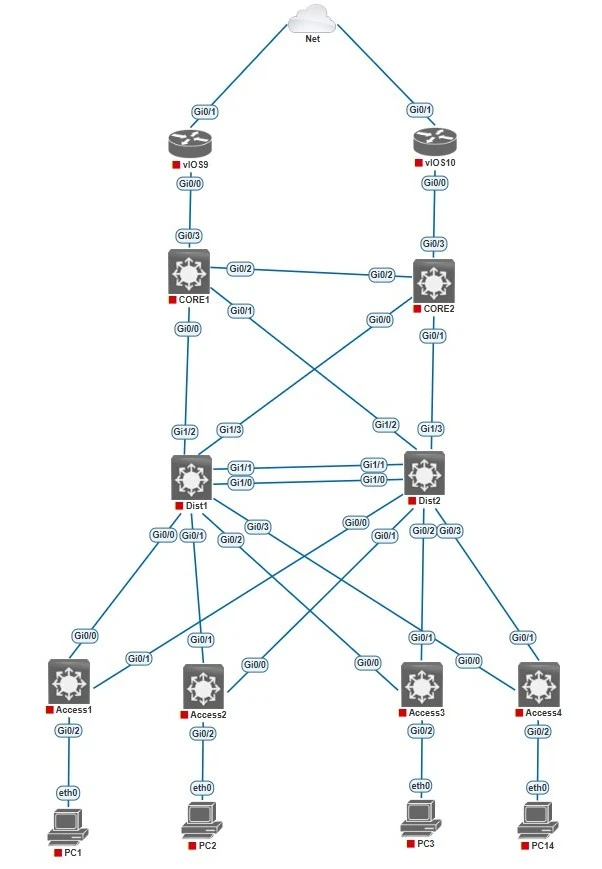
Change Hostname of all Switches according to diagram.
hostname Core1
hostname Core2
hostname Dist1
hostname Dist2
hostname Access1
hostname Access2
hostname Access3
hostname Access4
Configure Banners, Password Encryption and disable domain-lookup to unnecessary DNS lookups on all Switches and Routers.
no ip domain-lookup
service password-encryption
banner motd $
Unauthorized access is prohibited!
$
Configure Passwords on all the Switches and Routers.
CORE1(config)enable secret cisco123

CORE1(config)CORE1(config)line con 0
CORE1(config)password cisco
CORE1(config)login

CORE1(config)line vty 0 4
CORE1(config)password cisco
CORE1(config)login
CORE1(config)transport input ssh
Configure SSH on all the switches and routers.
CORE1(config)#ip domain-name cisco.com

CORE1(config)#crypto key generate rsa
It will ask you for key module by default 512.
How many bits in the modulus [512]: 1024

CORE1(config)#ip ssh version 2
CORE1(config)#line vty 0 4
CORE1(config-line)#transport input ssh
CORE1(config-line)#login local
CORE1(config)#username admin password cisco
CORE1(config)#line vty 0 4
CORE1(config-line)#transport input ssh
CORE1(config-line)#login local
Configure VLANs on all Distribution Switches and Access Switches.
Dist1(config)vlan 60
Dist1(config)name Management
Dist1(config)vlan 61
Dist1(config)name Servers
Dist1(config)vlan 62
Dist1(config)name IT
Dist1(config)vlan 63
Dist1(config)name HR
Save configs on all the devices.
copy running-config startup-config

or

write memory
Verification Commands:
show vlan brief
show running-config
Part 1: Designing a Scalable Cisco Network Topology: Core, Distribution, and Access Layers
🔜 Coming Up Next:
Part 3: Designing a Scalable Cisco Network Topology: VLANs and Trunk Links Between Switches.
VLAN assignments and trunking setup.
Stay Connected and Follow with me.
Tags:
Cisco
Network