
Part 3: Designing a Scalable Cisco Network Topology: VLANs and Trunk Links Between Switches
 Suresh Thapa
In this part, we will focus on segmenting the network using VLANs and establishing trunk links between switches to allow inter-switch VLAN communication. VLANs (Virtual Local Area Networks) are essential for logically separating devices within the same physical network infrastructure — improving security, reducing broadcast domains, and organizing traffic based on function or department.
At the same time, trunk ports are used to carry traffic from multiple VLANs across switches, ensuring VLAN consistency throughout the topology.
Objectives
- Define and create VLANs on all relevant switches.
- Assign VLANs to access ports connected to PCs or departments.
- Configure trunk ports between access and distribution switches.
- Verify VLAN and trunk configurations.
Network Diagram
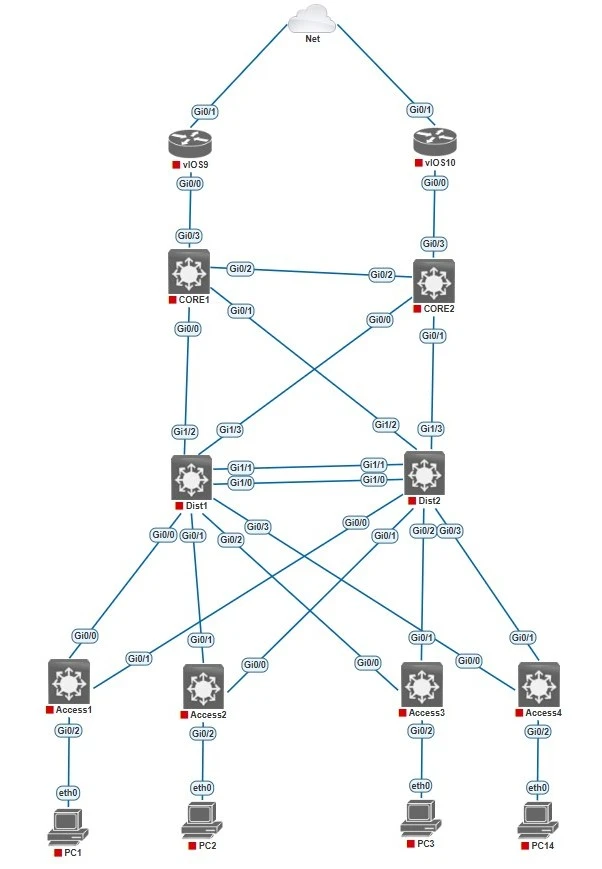
IP and VLAN Planning:
| VLAN ID | VLAN Name | IP Address |
|---|---|---|
| 60 | Management | 10.1.60.0/24 |
| 61 | Servers | 10.1.61.0/24 |
| 62 | IT | 10.1.62.0/24 |
| 63 | HR | 10.1.63.0/24 |
| Device | Port | VLAN | Description |
|---|---|---|---|
| Access1 | Gi0/2 | 60 | Management PC |
| Access2 | Gi0/2 | 61 | Server PC |
| Access3 | Gi0/2 | 62 | IT PC |
| Access4 | Gi0/2 | 63 | HR |
Trunk Ports Setup
- Why trunks? When you have multiple VLANs configured across multiple switches, you need trunk links to carry all VLAN traffic between them.
- Use 802.1Q encapsulation on trunk links.
- Connect access switches (Access1–Access4) to distribution switches (Dist1, Dist2) via trunk ports.
- Example:
Access1 Gi0/0 <--> Gi0/0 Dist1
Create VLANs on all Distribution Switches and Access Switches.
Dist1(config)vlan 60
Dist1(config)name Management
Dist1(config)vlan 61
Dist1(config)name Servers
Dist1(config)vlan 62
Dist1(config)name IT
Dist1(config)vlan 63
Dist1(config)name HR
Assign access port
Access1 Switch
Access1(config)#interface gigabitEthernet 0/2
Access1(config-if)#switchport mode access
Access1(config-if)#switchport access vlan 60
Access1(config-if)# description "Access port to PC1"
Access1(config-if)#no shutdow
Access2 Switch
Access2(config)#interface gigabitEthernet 0/2
Access2(config-if)#switchport mode access
Access2(config-if)#switchport access vlan 61
Access2(config-if)# description "Access port to PC2"
Access2(config-if)#no shutdow
Access3 Switch
Access3(config)#interface gigabitEthernet 0/2
Access3(config-if)#switchport mode access
Access3(config-if)#switchport access vlan 62
Access3(config-if)# description "Access port to PC3"
Acces3(config-if)#no shutdow
Access4 Switch
Access4(config)#interface gigabitEthernet 0/2
Access4(config-if)#switchport mode access
Access4(config-if)#switchport access vlan 63
Access4(config-if)# description "Access port to PC4"
Access4(config-if)#no shutdow
Configure trunk link
Exact same configs on all the Access switches needs to configure.
Access1(config)#interface gi0/0
Access1(config-if)# switchport trunk encapsulation dot1q
Access1(config-if)# switchport mode trunk
Access1(config-if)# description Trunk to Distribution1 Switch
Access1(config)#interface gi0/1
Access1(config-if)# switchport trunk encapsulation dot1q
Access1(config-if)# switchport mode trunk
Access1(config-if)# description Trunk to Distribution2 Switch
Exact same configs on all the Distribution 2 switches needs to configure.
Dist1(config)#interface gi0/0
Dist1(config-if)# switchport trunk encapsulation dot1q
Dist1(config-if)# switchport mode trunk
Dist1(config-if)# description "Trunk to Access1 Switch"
Dist1(config)#interface gi0/1
Dist1(config-if)# switchport trunk encapsulation dot1q
Dist1(config-if)# switchport mode trunk
Dist1(config-if)# description "Trunk to Access2 Switch"
Dist1(config)#interface gi0/2
Dist1(config-if)# switchport trunk encapsulation dot1q
Dist1(config-if)# switchport mode trunk
Dist1(config-if)# description "Trunk to Access3 Switch"
Dist1(config)#interface gi0/3
Dist1(config-if)# switchport trunk encapsulation dot1q
Dist1(config-if)# switchport mode trunk
Dist1(config-if)# description "Trunk to Access4 Switch"
Save configs on all the devices.
copy running-config startup-config

or

write memory
Verification Commands:
show vlan brief
show interfaces trunk
show interfaces switchport
🔜 Next Coming Up: Part 4 – Spanning Tree Protocol (STP) to prevent loops and ensure network stability
→ STP modes, root bridge, port states
Part 1: Designing a Scalable Cisco Network Topology: Core, Distribution, and Access Layers
Part 2: Designing a Scalable Cisco Network Topology: Basic Switch Configuration and VLAN Planning.
Stay Connected and Follow with me