
Part 6: Designing a Scalable Cisco Network Topology: Inter-VLAN Routing with Layer 3 Switches Using SVIs
 Suresh Thapa
By default, VLANs on a switch are isolated from one another — devices in VLAN 10 can’t communicate with devices in VLAN 20 unless routing is configured. That’s where Inter-VLAN Routing comes in. In enterprise networks, this is best handled by Layer 3 switches using SVIs (Switched Virtual Interfaces).
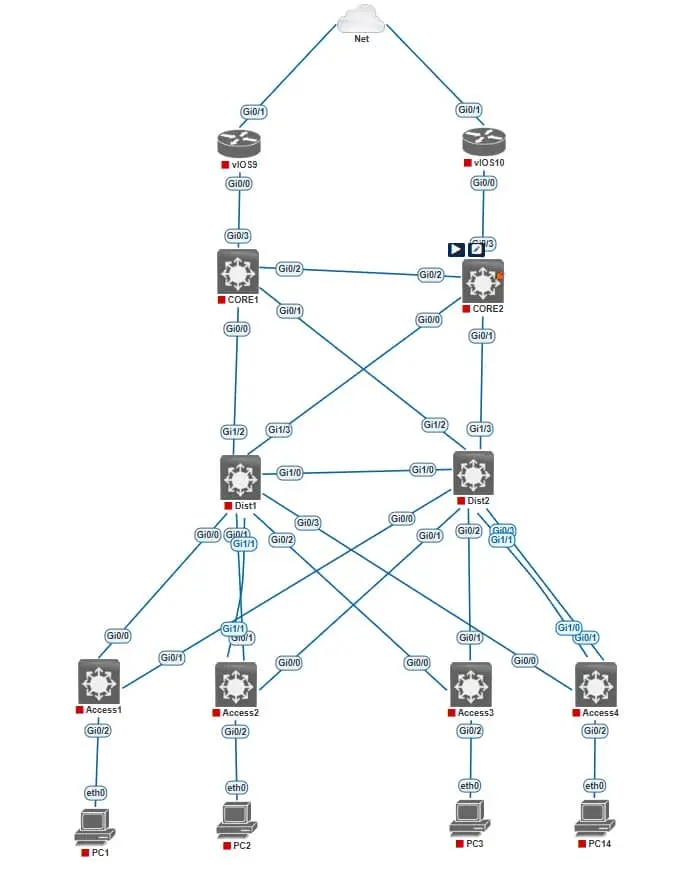
In this part, you'll configure SVIs on your distribution layer switches (Dist1 and Dist2) to allow communication between different VLANs (Admin, HR, IT, etc.) without using external routers. This setup provides faster routing, reduced latency, and simpler network management.
Objectives
- Understand how Inter-VLAN routing works using SVIs.
- Configure IP addresses for VLAN interfaces (SVIs) on L3 switches.
- Set up default gateways for end devices.
- Test communication between VLANs.
Why SVIs Instead of Router-on-a-Stick?
| Method | Pros | Use Case |
|---|---|---|
| SVI (L3 switch) | High speed, cleaner design | Enterprise/campus networks |
| Router-on-a-Stick | Works with L2 switches | Small networks/labs |
In your topology, Switch3 and Switch4 are Layer 3 switches, so SVI-based Inter-VLAN routing is the ideal solution.
VLAN IP Address Plan (Example)
| VLAN | Subnet | SVI IP on Dist1 | SVI IP on Dist2 | Purpose |
|---|---|---|---|---|
| 60 | 10.1.60.0/24 | 10.1.60.2 | 10.1.60.3 | Management |
| 61 | 10.1.61.0/24 | 10.1.61.2 | 10.1.61.3 | Server |
| 62 | 10.1.62.0/24 | 10.1.62.2 | 10.1.62.3 | IT |
| 63 | 10.1.63.0/24 | 10.1.63.2 | 10.1.63.3 | HR |
Network Topology
Configuration on Dist1 (L3 Switch)
Dist1(config)#interface vlan 60
Dist1(config-if)#ip address 10.1.60.2 255.255.255.0
Dist1(config-if)#no shutdown
Dist1(config-if)#interface vlan 61
Dist1(config-if)#ip address 10.1.61.2 255.255.255.0
Dist1(config-if)#no shutdown
Dist1(config-if)#interface vlan 62
Dist1(config-if)#ip address 10.1.62.2 255.255.255.0
Dist1(config-if)#no shutdown
Dist1(config-if)#interface vlan 63
Dist1(config-if)#ip address 10.1.63.2 255.255.255.0
Dist1(config-if)#no shutdown
Configuration on Dist2 (L3 Switch)
Dist1(config)#interface vlan 60
Dist1(config-if)#ip address 10.1.60.3 255.255.255.0
Dist1(config-if)#no shutdown
Dist1(config-if)#interface vlan 61
Dist1(config-if)#ip address 10.1.61.3 255.255.255.0
Dist1(config-if)#no shutdown
Dist1(config-if)#interface vlan 62
Dist1(config-if)#ip address 10.1.62.3 255.255.255.0
Dist1(config-if)#no shutdown
Dist1(config-if)#interface vlan 63
Dist1(config-if)#ip address 10.1.63.3 255.255.255.0
Dist1(config-if)#no shutdown
On each PC (PC1–PC4):
Set the default gateway as the .1 IP for its VLAN.
Example for Management PC: 10.1.60.1
Verification Commands
show ip interface brief
show vlan brief
show ip route
🔜 Next Up: Part 7 – HSRP for Redundant Gateway Configuration Using L3 Switches
Part 1: Designing a Scalable Cisco Network Topology: Core, Distribution, and Access Layers
Part 2: Designing a Scalable Cisco Network Topology: Basic Switch Configuration and VLAN Planning.
Part 3: Designing a Scalable Cisco Network Topology: VLANs and Trunk Links Between Switches
Part 5: Designing a Scalable Cisco Network Topology: Link Aggregation with EtherChannel
Stay Connected and Follow with me