
How to Build a Juniper EVPN-VXLAN Fabric: Test PCs & ESI Multihoming (Part 4)
 Suresh Thapa
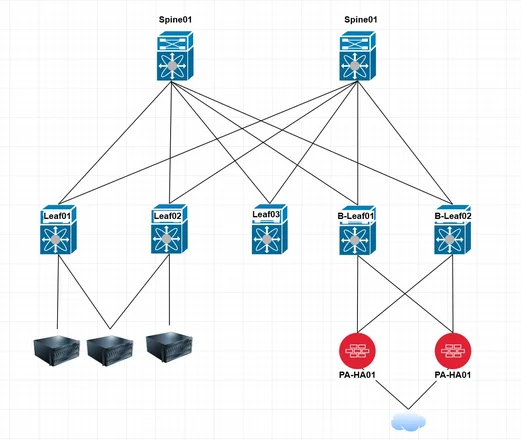
In previous parts, we built a complete EVPN-VXLAN fabric:
Now in Part 4, we focus on:
- Connecting end devices (Test PCs/Servers)
- Configuring ESI Multihoming (Active-Active redundancy)
- Connecting Test PCs (Single-homed)
This is where your design becomes production-ready.
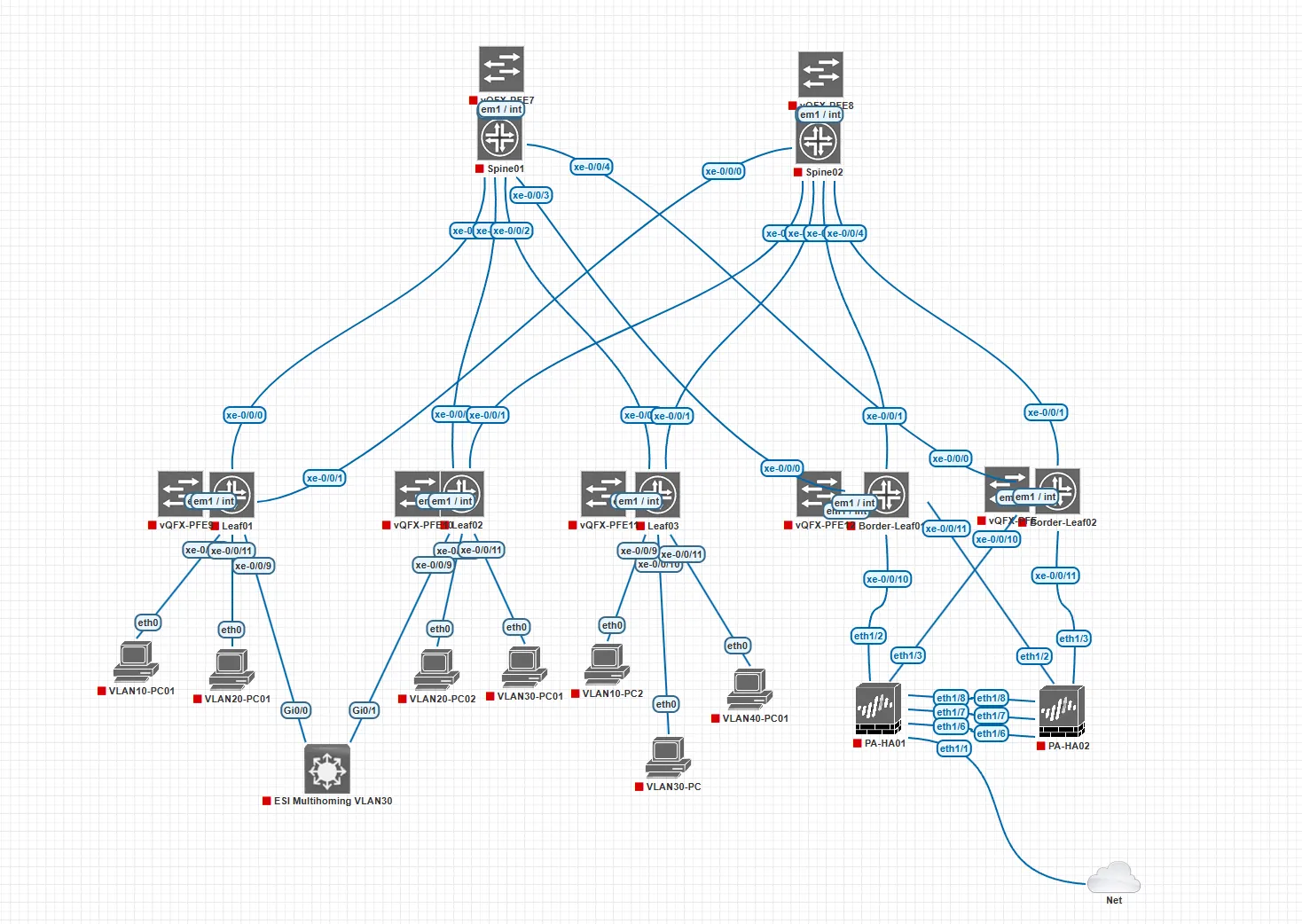
What is ESI Multihoming?
ESI (Ethernet Segment Identifier) allows a server to connect to multiple leaf switches simultaneously.
Without ESI:
- Single-homed → No redundancy
- Link failure = Server down
With ESI Multihoming:
- Dual-homed → Connected to 2 leafs
- Active-Active forwarding
- No STP required
Step 1: Configure Server Bond (Test PC)
On Linux server (or VM), configure bonding:
mode=802.3ad (LACP)
bond0 → eth0 + eth1
IP → 192.168.10.10/24
GW → 192.168.10.1
This allows:
- Load balancing
- Redundancy
- Seamless failover
Step 2: Configure ESI on Leaf01
set interfaces ae0 aggregated-ether-options lacp active
set interfaces ae0 aggregated-ether-options esi 00:11:22:33:44:55:66:77:88:99
set interfaces ae0 unit 0 family ethernet-switching interface-mode access
set interfaces ae0 unit 0 family ethernet-switching vlan members C1-VLAN10
Step 3: Configure ESI on Leaf02
⚠️ IMPORTANT: Same ESI must be used on both leafs
set interfaces ae0 aggregated-ether-options lacp active
set interfaces ae0 aggregated-ether-options esi 00:11:22:33:44:55:66:77:88:99
set interfaces ae0 unit 0 family ethernet-switching interface-mode access
set interfaces ae0 unit 0 family ethernet-switching vlan members C1-VLAN10
Step 4: Enable All-Active Multihoming
set protocols evpn ethernet-segment all-active
This enables:
- Active-Active forwarding
- Load balancing across both leafs
Step 5: Configure AE Interfaces
Add physical interfaces into AE bundle:
Leaf01
set interfaces xe-0/0/9 ether-options 802.3ad ae0
Leaf02
set interfaces xe-0/0/9 ether-options 802.3ad ae0
Step 1: Access Port Configuration (Leaf01)
set interfaces xe-0/0/10 unit 0 family ethernet-switching interface-mode access
set interfaces xe-0/0/10 unit 0 family ethernet-switching vlan members C1-VLAN10

set interfaces xe-0/0/11 unit 0 family ethernet-switching interface-mode access
set interfaces xe-0/0/11 unit 0 family ethernet-switching vlan members C2-VLAN20
Step 2: Access Port Configuration (Leaf02)
set interfaces xe-0/0/10 unit 0 family ethernet-switching interface-mode access
set interfaces xe-0/0/10 unit 0 family ethernet-switching vlan members C1-VLAN10

set interfaces xe-0/0/11 unit 0 family ethernet-switching interface-mode access
set interfaces xe-0/0/11 unit 0 family ethernet-switching vlan members C2-VLAN20
Test Devices Setup
On Leaf01
- PC1 → VLAN 10
- IP:
192.168.10.10/24 - GW:
192.168.10.1
- IP:
- PC2 → VLAN 20
- IP:
192.168.20.10/24 - GW:
192.168.20.1
- IP:
On Leaf02
- PC3 → VLAN 10
- IP:
192.168.10.20/24 - GW:
192.168.10.1
- IP:
- PC4 → VLAN 20
- IP:
192.168.20.20/24 - GW:
192.168.20.1
- IP:
Expected Connectivity
| Source | Destination | Expected Result |
|---|---|---|
| PC1 (Leaf01 VLAN10) | PC3 (Leaf02 VLAN10) | Ping Success |
| PC2 (Leaf01 VLAN20) | PC4 (Leaf02 VLAN20) | Ping Success |
| PC1 → PC2 | ❌ Blocked (Different VLANs unless routed) | |
| PC1 → PC4 | ❌ Blocked (Different VLANs) |
👉 Same VLAN traffic is extended across fabric using VXLAN.
Traffic Flow Explained
Same VLAN Traffic (Across Leafs)
Example:
- PC1 → PC3 (VLAN 10)
Flow:
- PC1 → Leaf01 → VXLAN Tunnel → Leaf02 → PC3
Learned via EVPN (no flooding)
Dual-Homed Server Traffic
- Load-balanced across Leaf01 & Leaf02
- Both links active
Failure Scenario
- One leaf down → traffic continues
- No session drop
Key Benefits
- Active-Active server connectivity
- No Spanning Tree
- Seamless Layer 2 extension
- Optimal traffic forwarding
- High availability
Common Mistakes
- VLAN mismatch across leafs
- Missing VNI mapping
- Wrong gateway IP
- ESI mismatch
- LACP not configured on server
Full Series Recap
Part 4 → Test PCs + ESI Multihoming
Tags:
BGP
EVPN
Juniper
VXLAN