
How to Build a Juniper EVPN-VXLAN Fabric: BGP EVPN Overlay (Part 2)
 Suresh Thapa
n Part 1, we built the underlay network that provides IP reachability across the fabric.
Now in Part 2, we move to the control plane of the overlay — BGP EVPN, which is the brain of the VXLAN fabric.
This is where:
- MAC addresses are learned
- VXLAN tunnels are controlled
- Tenant networks are extended across the fabric
What is BGP EVPN Overlay?
BGP EVPN replaces traditional flooding-based learning with a control-plane driven approach.
Instead of:
Flood & Learn
We use:
BGP to distribute MAC/IP information
Overlay Design in This Lab
- Spine → Acts as Route Reflector (RR)
- Leafs → EVPN clients (VTEPs)
- Peering → eBGP (recommended for scalability)
- Source IP → Loopback (lo0)
Why Use eBGP for EVPN?
eBGP is widely used in modern fabrics because:
- Simple design (no IGP dependency for overlay)
- Better scalability
- Clear ASN separation per leaf
- Faster convergence
Spine Configuration (Route Reflector)
The spine acts as a central control-plane node that reflects EVPN routes between leaf switches.
Explanation
- type external
→ Using eBGP between spine and leaf - family evpn signaling
→ Enables EVPN route exchange (MAC/IP routes) - multihop ttl 5
→ Required because loopback interfaces are used - no-nexthop-change
→ Preserves the original VTEP IP (very important for VXLAN) - local-address should be the loopback address ex-10.0.0.1
→ Spine loopback used for BGP peering - multipath
→ Enables ECMP for load balancing
Key Design Concept
- Each leaf has its own ASN
- Spine is in a different ASN
- Spine acts as a Route Reflector-like node in eBGP design
👉 This avoids full mesh between leaf switches.
How Route Reflection Works Here
- Leaf sends EVPN routes to Spine
- Spine reflects routes to all other Leafs
- Leafs learn MAC/IP of remote endpoints
Topology
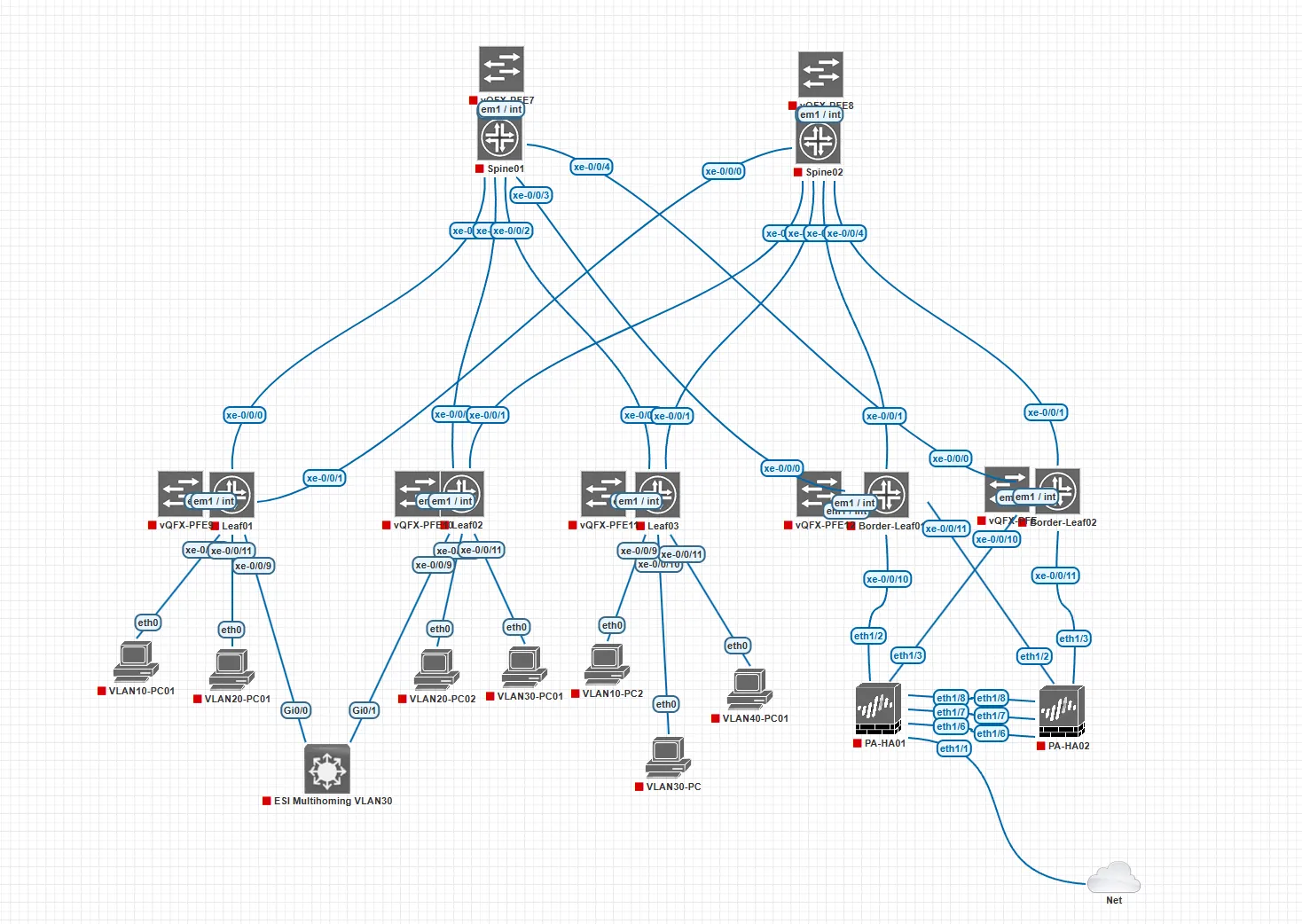
Step 1: Configure BGP EVPN Overlay Group
Spine01
# Configure the BGP Overlay Group
set protocols bgp group EVPN-OVERLAY type external
set protocols bgp group EVPN-OVERLAY family evpn signaling
set protocols bgp group EVPN-OVERLAY multihop ttl 5
set protocols bgp group EVPN-OVERLAY multihop no-nexthop-change
set protocols bgp group EVPN-OVERLAY local-address 10.0.0.1
set protocols bgp group EVPN-OVERLAY multipath
Step 2: Configure Leaf Neighbors
Each leaf peers with the spine using its loopback IP.
# Peer with Leaf 01
set protocols bgp group EVPN-OVERLAY neighbor 10.0.0.11 peer-as 65101
# Peer with Leaf 02
set protocols bgp group EVPN-OVERLAY neighbor 10.0.0.12 peer-as 65102
# Peer with Leaf 03
set protocols bgp group EVPN-OVERLAY neighbor 10.0.0.13 peer-as 65101
# Peer with Leaf 04
set protocols bgp group EVPN-OVERLAY neighbor 10.0.0.14 peer-as 65102
# Peer with Leaf 05
set protocols bgp group EVPN-OVERLAY neighbor 10.0.0.15 peer-as 65102
Spine02
# Configure the BGP Overlay Group
set protocols bgp group EVPN-OVERLAY type external
set protocols bgp group EVPN-OVERLAY family evpn signaling
set protocols bgp group EVPN-OVERLAY multihop ttl 5
set protocols bgp group EVPN-OVERLAY multihop no-nexthop-change
set protocols bgp group EVPN-OVERLAY local-address 10.0.0.2
set protocols bgp group EVPN-OVERLAY multipath
Configure Leaf Neighbors
# Peer with Leaf 01
set protocols bgp group EVPN-OVERLAY neighbor 10.0.0.11 peer-as 65101
# Peer with Leaf 02
set protocols bgp group EVPN-OVERLAY neighbor 10.0.0.12 peer-as 65102
# Peer with Leaf 03
set protocols bgp group EVPN-OVERLAY neighbor 10.0.0.13 peer-as 65103
# Peer with Leaf 04
set protocols bgp group EVPN-OVERLAY neighbor 10.0.0.14 peer-as 65104
# Peer with Leaf 05
set protocols bgp group EVPN-OVERLAY neighbor 10.0.0.15 peer-as 65105
Leaf01
# Configure the BGP Overlay Group
set protocols bgp group EVPN-OVERLAY type external
set protocols bgp group EVPN-OVERLAY family evpn signaling
set protocols bgp group EVPN-OVERLAY multihop ttl 5
set protocols bgp group EVPN-OVERLAY local-address 10.0.0.11
Configure Spine Neighbors
# Peer with Spine 01
set protocols bgp group EVPN-OVERLAY neighbor 10.0.0.1 peer-as 65000
# Peer with Spine 02 (If you have configured it)
set protocols bgp group EVPN-OVERLAY neighbor 10.0.0.2 peer-as 65000
Leaf02
set protocols bgp group EVPN-OVERLAY type external
set protocols bgp group EVPN-OVERLAY family evpn signaling
set protocols bgp group EVPN-OVERLAY multihop ttl 5
set protocols bgp group EVPN-OVERLAY local-address 10.0.0.12
Configure Spine Neighbors
# Peer with Spine 01
set protocols bgp group EVPN-OVERLAY neighbor 10.0.0.1 peer-as 65000
# Peer with Spine 02 (If you have configured it)
set protocols bgp group EVPN-OVERLAY neighbor 10.0.0.2 peer-as 65000
Leaf03
# Configure the BGP Overlay Group
set protocols bgp group EVPN-OVERLAY type external
set protocols bgp group EVPN-OVERLAY family evpn signaling
set protocols bgp group EVPN-OVERLAY multihop ttl 5
set protocols bgp group EVPN-OVERLAY local-address 10.0.0.13
Configure Spine Neighbors
# Peer with Spine 01
set protocols bgp group EVPN-OVERLAY neighbor 10.0.0.1 peer-as 65000
# Peer with Spine 02 (If you have configured it)
set protocols bgp group EVPN-OVERLAY neighbor 10.0.0.2 peer-as 65000
Border-Leaf01
# Configure the BGP Overlay Group
set protocols bgp group EVPN-OVERLAY type external
set protocols bgp group EVPN-OVERLAY family evpn signaling
set protocols bgp group EVPN-OVERLAY multihop ttl 5
set protocols bgp group EVPN-OVERLAY local-address 10.0.0.14
Configure Spine Neighbors
# Peer with Spine 01
set protocols bgp group EVPN-OVERLAY neighbor 10.0.0.1 peer-as 65000
# Peer with Spine 02 (If you have configured it)
set protocols bgp group EVPN-OVERLAY neighbor 10.0.0.2 peer-as 65000
Border-Leaf02
# Configure the BGP Overlay Group
set protocols bgp group EVPN-OVERLAY type external
set protocols bgp group EVPN-OVERLAY family evpn signaling
set protocols bgp group EVPN-OVERLAY multihop ttl 5
set protocols bgp group EVPN-OVERLAY local-address 10.0.0.15
Configure Spine Neighbors
# Peer with Spine 01
set protocols bgp group EVPN-OVERLAY neighbor 10.0.0.1 peer-as 65000
# Peer with Spine 02 (If you have configured it)
set protocols bgp group EVPN-OVERLAY neighbor 10.0.0.2 peer-as 65000
What Routes Are Exchanged?
BGP EVPN carries:
- Type 2 → MAC + IP routes (host reachability)
- Type 5 → IP Prefix routes (for L3 VXLAN)
- Type 3 → IMET routes (BUM traffic handling)
Verification Commands
After configuration, verify the overlay:
show bgp summary
show route table bgp.evpn.0
Expected Outcome
- BGP sessions should be Established
- EVPN routes should start appearing
- Leafs should learn remote MAC/IP entries
Common Mistakes
❌ Missing family evpn signaling
❌ Wrong loopback IP in local-address
❌ No underlay reachability between loopbacks
❌ Forgetting no-nexthop-change
Series Recap
- ✅ Part 1 → Underlay Network
- ✅ Part 2 → BGP EVPN Overlay (This Post)
- ✅ Part 3 → VXLAN + Anycast Gateway Configuration
Conclusion
The EVPN overlay is the core of a modern data center fabric. By using BGP, we achieve:
- Scalable MAC learning
- Efficient traffic forwarding
- Elimination of flooding
- Multi-tenant support
This lays the foundation for a fully automated, scalable VXLAN fabric.