
Building a Cisco VXLAN EVPN Fabric with NX-OSv – Part 2: EVPN Control Plane (BGP) & Multicast (PIM Anycast RP)
 Suresh Thapa
In Part 1, we built a stable underlay using OSPF and Layer 3 interfaces.
Now, we move to the control plane and multicast foundation of the VXLAN fabric.
This part focuses on:
- Enabling VXLAN EVPN control plane using BGP
- Configuring the Spine as a Route Reflector
Setting up PIM with Anycast RP for VXLAN BUM traffic
A properly designed control plane ensures scalability, while multicast guarantees efficient delivery of BUM traffic across the fabric.
1. Enabling VXLAN EVPN & BGP
Before configuring BGP, we enable the required features on all the switches:
nv overlay evpn
feature bgp
Why This Matters
nv overlay evpn→ Activates VXLAN EVPN capabilitiesfeature bgp→ Enables BGP for control-plane signaling
2. BGP EVPN Configuration (Spine as Route Reflector)
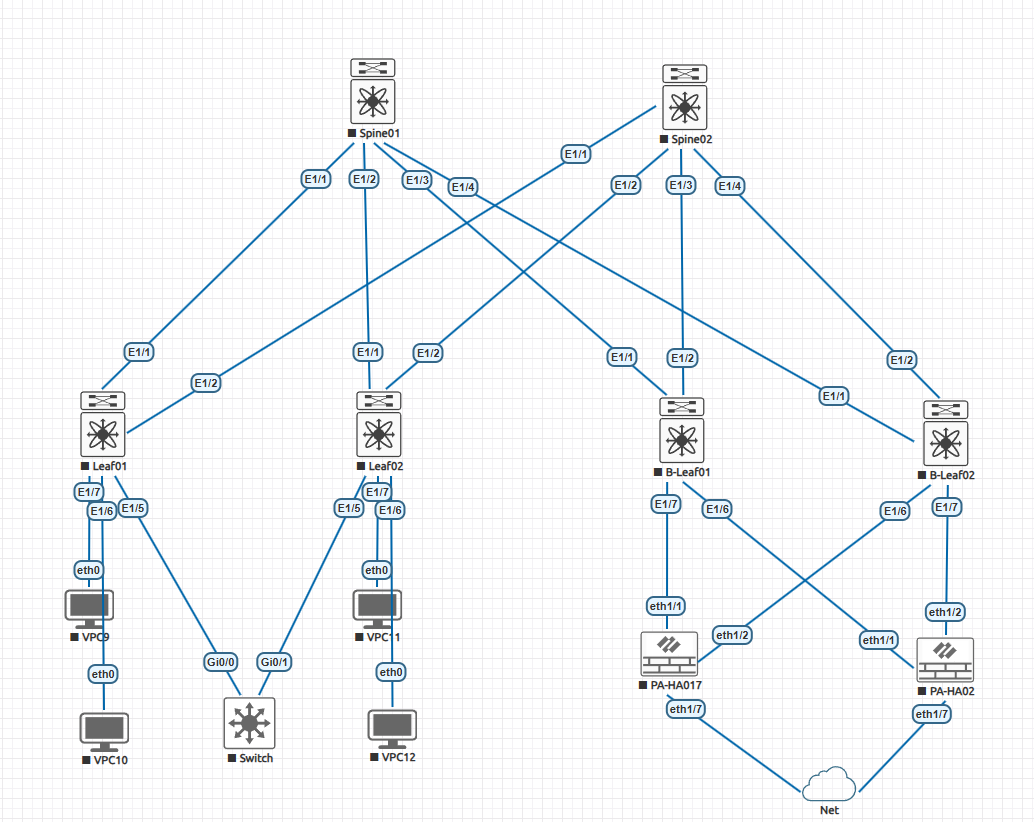
The spine acts as a Route Reflector (RR) so leaf switches don’t need full-mesh BGP sessions.
Base BGP Configuration
router bgp 65000
  router-id 1.1.1.1
  log-neighbor-changes
Key Points:
- AS 65000 → Common fabric ASN (iBGP)
- Router-ID → Matches loopback0
- Logging → Helps with troubleshooting neighbor state changes
3. Using BGP Peer Templates
Instead of repeating configuration for every leaf, we use a peer template:
template peer LEAF_FACES
  remote-as 65000
  update-source loopback0
  address-family l2vpn evpn
    route-reflector-client
    send-community extended
Spine01
router bgp 65000
  router-id 1.1.1.1
  log-neighbor-changes
Spine02
router bgp 65000
  router-id 2.2.2.2
  log-neighbor-changes
Same config on both the Spines
router bgp 65000
template peer LEAF_FACES
  remote-as 65000
  update-source loopback0
  address-family l2vpn evpn
    route-reflector-client
    send-community extended
Why Templates?
- Cleaner configuration
- Easy scalability
- Consistency across all leaf peers
Important Concepts
- update-source loopback0 → Stable peering using loopbacks
- l2vpn evpn → Enables EVPN address family
- route-reflector-client → Spine reflects routes between leafs
- send-community extended → Required for EVPN route exchange
4. Neighbor Configuration (Leaf Peering)
Apply the template to all Spine switches:
neighbor 11.11.11.11
  inherit peer LEAF_FACES

neighbor 22.22.22.22
  inherit peer LEAF_FACES

neighbor 33.33.33.33
  inherit peer LEAF_FACES

neighbor 44.44.44.44
  inherit peer LEAF_FACES
Leafs configs
Leaf01
router bgp 65000
 router-id 11.11.11.11
 log-neighbor-changes
Leaf02
router bgp 65000
 router-id 22.22.22.22
 log-neighbor-changes
B-Leaf01
router bgp 65000
 router-id 33.33.33.33
 log-neighbor-changes
B-Leaf02
router bgp 65000
 router-id 44.44.44.44
 log-neighbor-changes
Configure on all the Leafs
router bgp 65000
 log-neighbor-changes
 template peer SPINE_FACES
   remote-as 65000
   update-source loopback0
   address-family l2vpn evpn
     send-community extended

 # Applying the template
 neighbor 1.1.1.1
 inherit peer SPINE_FACES
 neighbor 2.2.2.2
 inherit peer SPINE_FACES
What’s Happening Here?
- Each neighbor represents a leaf switch loopback IP
- Spine forms iBGP EVPN sessions
- Spine reflects routes → leaf-to-leaf communication becomes possible
5. Why Route Reflector Design?
Without a Route Reflector:
- Every leaf must peer with every other leaf (full mesh)
With a Spine RR:
- Leafs only peer with spines
- Fabric becomes scalable and manageable
6. Multicast Requirement in VXLAN
VXLAN uses multicast to handle BUM traffic:
- Broadcast
- Unknown unicast
- Multicast
To support this, we configure PIM Sparse Mode.
7. Enable PIM on the Spine and Leafs
feature pim
8. Anycast RP Configuration
To avoid a single point of failure, we use Anycast RP across spines.
RP Loopback Interface on all the Spine switches
interface Loopback1
  description ANYCAST_RP_IP
  ip address 10.10.10.10/32
  ip router ospf 1 area 0
  ip pim sparse-mode
Why This is Important
- Shared RP IP → 10.10.10.10
- Advertised via OSPF → reachable from all devices
- Enables multicast control-plane stability
Configure Anycast RP on all the spines
ip pim anycast-rp 10.10.10.10 1.1.1.1
ip pim anycast-rp 10.10.10.10 2.2.2.2
Explanation
- 10.10.10.10 → Shared RP address
- 1.1.1.1 / 2.2.2.2 → Spine loopbacks acting as RP nodes
This provides:
- Redundancy
- Load balancing
- Fast failover
Advertise RP to the Fabric on all the switches
ip pim rp-address 10.10.10.10 group-list 224.0.0.0/4All devices now know where to send multicast joins.
9. Enable PIM on Interfaces all the switches
interface Loopback0
  ip pim sparse-mode

interface Ethernet1/1-4
  ip pim sparse-mode
Why?
- Ensures multicast routing works across:
- Spine ↔ Leaf links
- Loopback interfaces
10. Verification Commands
Use these to validate your setup:
show bgp l2vpn evpn summary
show bgp l2vpn evpn
show ip pim rp
show ip pim neighbor
Expected Results:
- BGP neighbors → Established
- EVPN routes → Being exchanged
- RP → Reachable from all nodes
- PIM neighbors → Formed correctly
11. Key Takeaways
| Component | Purpose |
|---|---|
| BGP EVPN | VXLAN control plane |
| Route Reflector | Scalable BGP design |
| PIM | Multicast transport |
| Anycast RP | Redundancy for multicast |
Conclusion
At this stage:
- The underlay (OSPF) is operational
- The control plane (BGP EVPN) is established
- The multicast foundation (PIM + Anycast RP) is ready
- Your fabric is now prepared to carry VXLAN traffic.